
When Your Email Workflow Stops Working: A Small Business Lesson
We normally talk about email marketing, customer communications and email automation here at ClickAndSend.
But sometimes the most useful email lessons come from something much more basic: how we actually use email every day to run our businesses.
So we’re sharing this one because it started with an email problem in our own business and led to a small web application that solved it.
The lesson is relevant to almost any small business, professional service firm or busy business owner who finds themselves repeatedly writing the same emails, copying and pasting information or keeping templates in Word documents and text files.
The problem started with our email service
Our hosting company recently decided to move us away from a long-established email service that we had been using for years.
The replacement service was perfectly capable of handling normal email. Sending, receiving, folders, contacts and the usual webmail functions were all there.
But something important to our particular workflow was missing.
Over the years, I had built up a collection of reusable email templates that I used regularly when dealing with suppliers.
These weren’t simply email signatures.
They were pro-forma business emails that contained most of the wording already prepared, with only certain details needing to be changed each time.
Why reusable emails matter to a small business
For example, when placing an order with a supplier, I might need to include:
- Our order reference
- Customer details
- Product information
- Shipping address
- Engraving or personalisation details
- Payment instructions
- Special delivery requirements
I also had templates for payment confirmations and other routine supplier communications.
The advantage was simple.
I wasn’t writing the same email from scratch every time.
I wasn’t trying to remember exactly what information a particular supplier needed.
And I wasn’t relying on memory to make sure that important instructions weren’t accidentally left out.
The template provided a consistent starting point.
For a small business, that can be more valuable than it sounds.
Then the workflow disappeared
The new email system could handle ordinary signatures, but it didn’t provide the same flexibility for the reusable emails I had built up.
My first thought was to find a browser extension that could solve the problem.
I tried a few.
Some looked promising, but none really fitted the way I wanted to work.
I didn’t want to move my entire email workflow into another platform.
I didn’t want another complicated system to administer.
And I didn’t want to become dependent on a particular browser extension.
So, for a while, I went back to the simplest possible solution.
I kept my templates in a text file and copied and pasted them when I needed them.
It worked.
But it was clumsy, and it introduced exactly the sort of small inefficiencies that tend to accumulate in a busy business.
The better question: can we improve the process?
This is where the problem became interesting.
Rather than looking for another piece of software that did almost what I wanted, I asked a different question:
What would the simplest possible tool look like if it was designed around the way I actually work?
The answer was a small web application.
So I built one.
Introducing Email Desk
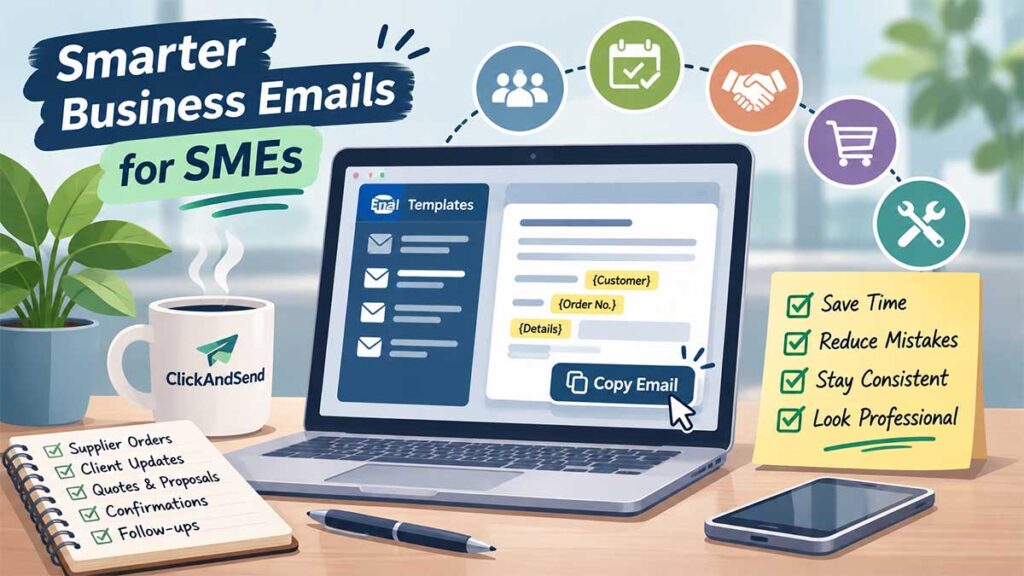
Email Desk is a simple browser-based application for storing and using reusable business email templates.
Instead of keeping templates in a text file, I have them organised in one place.
I can search them, select the one I need and fill in the information that changes from one email to the next.
For example, a supplier payment template might contain fields for:
- Invoice number
- Payment amount
- Payment reference
- Supplier details
An order template might contain:
- Customer name
- Order number
- Product details
- Shipping address
- Phone number
- Personalisation or engraving details
I simply enter the relevant information and Email Desk generates the finished email.
Then there is a one-click Copy Email button.
I copy the completed message, switch back to my normal webmail and paste it into the email.
That’s the entire workflow.
It’s a small improvement, but it solves a real problem
Email Desk isn’t intended to replace our email service.
It doesn’t need to.
It provides a simple productivity layer alongside it.
And that’s an important point for small businesses.
Digital transformation doesn’t always mean replacing everything you already use with a huge new platform.
Sometimes the best improvement is a small tool that removes one repetitive task from your working day.
Think about your own business emails
Most businesses have repetitive communications.
For a professional services firm, it might be:
- New client welcome emails
- Appointment confirmations
- Meeting follow-ups
- Quote or proposal emails
- Requests for information
- Payment reminders
- Project updates
- Client onboarding messages
For an ecommerce business, it could be:
- Supplier orders
- Payment confirmations
- Dispatch instructions
- Customer follow-ups
- Returns information
- Wholesale enquiries
For a trades or service business, it might be:
- Quote follow-ups
- Booking confirmations
- Appointment reminders
- Job instructions
- Customer updates
- Invoice communications
The details may change every time, but the basic structure of the email often doesn’t.
Templates can do more than save typing
There is another benefit to properly structured email templates.
Consistency.
If a particular email needs to contain five pieces of information, a good template makes it much less likely that someone will forget one of them.
It can also help ensure that customers receive consistent information regardless of who in the business sends the email.
That becomes increasingly important as a business grows and more people become involved in customer communication.
And this is where AI gets interesting
Once you have structured templates and information in one place, AI can become another useful layer.
Imagine generating your standard email and then asking AI to:
- Polish the email
- Make it friendlier
- Make it more professional
- Make it shorter
- Make it firmer
- Write a reply
That is potentially much more useful than simply asking AI to write every email from scratch.
The business already knows what it wants to say. AI can help improve how it is said.
Could Email Desk become a service?
Possibly.
What started as a solution to a problem in our own business could be useful to other SMEs and professional service businesses dealing with the same sort of repetitive communication.
We’re considering whether to develop Email Desk into a standalone service, but there is a broader point here that applies regardless of what happens with the product.
Don’t automatically assume that a problem requires a bigger software package.
Sometimes you need better use of the tools you already have.
Sometimes you need automation.
Sometimes a simple template system will do the job.
And occasionally, the most practical solution is to build a small application specifically around the way your business works.
What could you improve in your business?
This is one of the questions we regularly ask at ClickAndSend.
Where are you or your team still relying on copy-and-paste?
Which emails are being written repeatedly?
Which customer communications depend on someone remembering what to include?
Where are spreadsheets, documents or disconnected systems being used to manage something that could be automated?
These may seem like small issues individually, but removing a few minutes of repetitive work every day can make a significant difference over a year.
Need help improving your business communications?
At ClickAndSend, we work with small businesses and professional service firms to make better use of email, automation and increasingly AI.
That might mean improving an existing email marketing process, automating repetitive customer communications, introducing AI into your workflow or simply finding a better way of handling something that currently takes too much time.
If there is a business communication problem you’ve been working around rather than solving, get in touch.
Sometimes the best solution is simpler than you think.
Book 15 Minute Chat Contact Us TodayNeed To Send A Simple Group Email When On The Go?
Discover snas.app, our no-fuss way to send email newsletters, group emails and updates, without an email builder, direct from your usual email.
Use email? Then you can use snas.app. Send a rough email to snas.app, receive a polished version, approve and snas does the rest!